When it comes to managing production and procurement inside SAP, SAP MRP is not just another functionality buried inside the system—it is the heartbeat of the entire supply chain. For consultants working in Materials Management (MM) or Production Planning (PP), understanding SAP MRP deeply is what separates average implementations from truly optimized operations.
At its core, SAP MRP (Material Requirements Planning) ensures the right material is available in the right quantity at the right time. Sounds simple, right? But behind that simplicity lies powerful logic, master data precision, and system-driven automation that keeps businesses running smoothly.
In this detailed, consultant-focused guide, we’ll explore the end-to-end SAP MRP process—from logic and configuration to execution and troubleshooting—using practical examples and real-world insights.
Understanding the Core Logic of SAP MRP
Before diving into transactions and configuration screens, every consultant must first understand how SAP MRP “thinks.” The system follows a structured four-step logic during every MRP run.
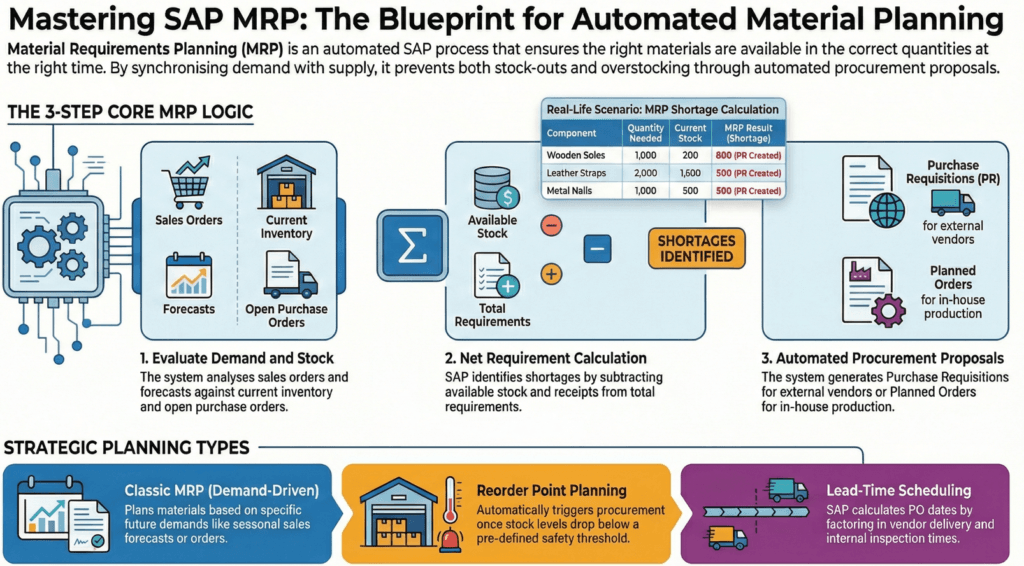
1. Checking Demand
The process begins by identifying all demand sources, such as:
- Sales Orders
- Planned Independent Requirements (PIRs)
- Forecasts
- Planned Production Orders
If a customer places an order for 1,000 finished goods, SAP immediately registers that as demand.
2. Evaluating Available Stock
Next, SAP evaluates supply elements, including:
- Unrestricted stock
- Open purchase orders
- Existing production orders
- Planned receipts
The system balances demand against current and incoming supply.
3. Calculating Shortages
When demand exceeds available stock and confirmed receipts, SAP calculates the exact shortage quantity. No guesswork. No spreadsheets.
4. Generating Procurement Proposals
Finally, SAP MRP automatically creates:
- Purchase Requisitions (PRs) for externally procured materials
- Planned Orders for in-house manufactured materials
This automation is what makes SAP MRP so powerful—it removes manual planning and reduces errors.
The Wooden Sandal Scenario: Real-World MRP Logic
Let’s simplify this with a practical example.
Imagine a company manufacturing wooden sandals. To produce 1,000 sandals, you need:
- 1,000 soles
- 2,000 leather straps
- 1,000 nails
Now assume:
- A sales order is received for 1,000 sandals
- Only 200 soles are in stock
SAP MRP instantly identifies a shortage of 800 soles. Instead of someone calculating this manually, the system generates a Purchase Requisition for 800 soles automatically.
That’s the beauty of SAP MRP—it prevents production delays and eliminates last-minute chaos.
Choosing the Right Planning Strategy in SAP MRP
Not all materials behave the same way. As a consultant, selecting the correct MRP type is critical.
Classic MRP (Type PD)
This is the most commonly used MRP type.
- Demand-driven planning
- Based on sales orders and forecasts
- Ideal for finished goods and semi-finished products
If summer demand for sandals is expected to spike, Classic MRP plans procurement in advance based on forecasted data.
Reorder Point Planning (Type VB)
This method works best for fast-moving or low-value items like screws, nails, or packaging materials.
- Procurement triggers automatically when stock drops below a predefined level.
- Example: If reorder point is 200 soles, SAP creates a PR when stock reaches 199.
It’s simple and effective for consumables.
Forecast-Based Planning
This method uses historical consumption data to predict future needs.
If your plant consistently consumes 2,000 leather straps every month, SAP suggests procurement accordingly.
For deeper insights into SAP planning methodologies, SAP’s official documentation provides valuable technical guidance:
https://help.sap.com
The Consultant’s Checklist: Critical Master Data for SAP MRP
An MRP run is only as reliable as the data behind it. Poor master data leads to poor planning. Period.
Here’s what every consultant must validate.
Material Master (MM01)
This is the backbone of SAP MRP configuration.
Key fields to configure:
- MRP Type (PD, VB, etc.)
- Lot Sizing Procedure (EX – Lot-for-Lot)
- MRP Controller
- Planned Delivery Time
- Procurement Type (E for in-house, F for external)
A small mistake here can create massive downstream issues.
Bill of Materials – BOM (CS01)
The BOM acts as a blueprint.
It defines:
- Component materials
- Quantities required
- Alternative components (if applicable)
Without a properly maintained BOM, SAP cannot explode requirements from finished goods to raw materials.
Routing (CA01)
While the BOM defines “what” is needed, Routing defines “how” it is produced.
It includes:
- Work centers
- Operation sequences
- Standard times
SAP uses both BOM and Routing during multi-level planning.
Planning File Entry (MD20)
This is often overlooked.
The Planning File Entry tells SAP whether a material needs to be included in the next MRP run. If it’s missing, the material won’t be planned—even if demand exists.
This is a common troubleshooting checkpoint for consultants.
MD04: The Real-Time SAP MRP Dashboard
If there is one transaction every consultant must master, it’s MD04 – Stock/Requirements List.
MD04 provides:
- Current stock levels
- Sales orders
- Purchase orders
- Planned orders
- Shortages
It updates in real time.
The moment a sales order is created, MD04 reflects the impact. You can also convert planned orders or PRs directly from this screen.
Think of MD04 as your live operational cockpit.
Executing the SAP MRP Run
For targeted planning, consultants often use:
Single-Item, Multi-Level MRP (MD02)
This transaction plans:
- One specific material
- All its dependent components
It’s ideal for testing or focused re-planning.
After executing MD02, you check results in MD04.
Typical outputs include:
- Purchase Requisitions for raw materials
- Planned Orders for finished goods
For plant-wide planning, transactions like MD01 can be used, but MD02 remains a consultant’s best friend during configuration and testing.
Scheduling in SAP MRP: The Secret to Perfect Timing
One of the most valuable contributions a consultant can make is configuring lead times correctly.
SAP calculates procurement dates by working backward from the requirement date.
Example Calculation
- Requirement Date: August 30
- Goods Receipt Processing Time: 1 day
- Planned Delivery Time: 7 days
SAP calculates the Purchase Order release date as August 22.
This backward scheduling ensures materials arrive exactly when needed—not too early, not too late.
Incorrect lead times often result in production stoppages or excess inventory. Accurate scheduling transforms supply chain reliability.
From MRP to Payment: Closing the Procurement Loop
SAP MRP initiates planning, but consultants must understand how the full cycle concludes.
1. Purchase Order Creation (ME21N)
Convert the MRP-generated Purchase Requisition into a Purchase Order.
This formalizes the agreement with the vendor.
2. Goods Receipt (MIGO)
When materials arrive:
- Post Goods Receipt
- Inventory updates automatically
- Accounting entries are generated
3. Invoice Verification (MIRO)
Match:
- Purchase Order
- Goods Receipt
- Vendor Invoice
Once matched, payment is cleared.
This complete Procure-to-Pay cycle begins with SAP MRP and ends with financial settlement.
Common Challenges in SAP MRP and How Consultants Solve Them
Even well-configured systems face issues. Here are common problems:
- Materials not planned → Check Planning File Entry
- Incorrect quantities → Review Lot Sizing and Safety Stock
- Late deliveries → Validate Planned Delivery Time
- Excess inventory → Analyze forecast accuracy
Troubleshooting requires both technical knowledge and business understanding.
Best Practices for Consultants Implementing SAP MRP
To ensure a successful implementation:
- Maintain accurate master data
- Regularly validate lead times
- Conduct user training on MD04
- Test MRP scenarios before go-live
- Monitor exception messages daily
Strong governance around master data ensures long-term success.
Frequently Asked Questions (FAQs)
1. What is SAP MRP used for?
SAP MRP is used to plan materials required for production and procurement, ensuring timely availability without overstocking.
2. What is the difference between PD and VB in SAP MRP?
PD is demand-driven planning based on sales and forecasts, while VB is reorder point planning triggered by stock levels.
3. Why is MD04 important for consultants?
MD04 provides real-time visibility of stock and requirements, making it essential for monitoring shortages and planning results.
4. What happens if Planning File Entry is missing?
The material will not be included in the MRP run, even if demand exists.
5. How does SAP calculate procurement dates?
SAP uses backward scheduling from the requirement date, subtracting delivery and processing times.
6. Can SAP MRP create production orders automatically?
Yes, depending on configuration, SAP can generate planned orders or even automatically convert them into production orders.
Conclusion: Why Mastering SAP MRP Defines Great Consultants
Mastering SAP MRP requires more than memorizing transaction codes. It demands a clear understanding of business logic, precise master data configuration, and proactive monitoring.
When implemented correctly, SAP MRP:
- Prevents stock-outs
- Reduces excess inventory
- Automates procurement
- Improves production reliability
For SAP consultants, this is not just another moduleit is the engine that drives operational excellence.
By mastering SAP MRP, you don’t just configure a system. You enable a business to run smoothly, efficiently, and profitably.
You might also find the following articles interesting.
- enterprise with sap business ai
- sap s4hana transition guide to data migration
- sap clean core
- SAP S/4HANA private cloud 2025
- introduction sap btp for consultants
- sap consultants productivity with joule
- Migration guide to SAP data migration
- SAP btp guide to app development
- Transformation journey 4hana implementation
- Empowering enterprises with SAP solutions
- blackline tool vs traditional process
- Sap cutover plan a comprehensive guide
- Fiori Configuration Guide
- SAP ECC to S4HANA data migration
- earn sap btp
- Retail insights with sap car
- leanix an introductory guide
- building side-by-side extensions on SAP BTP
- sap ecc vs s4 hana key changes and benefits
- sap ides
- Understanding RFNO in SAP s4hana
- SAP Clean Core
- SAP ABAP beginner’s journey
- Grow with sap vs rise with sap comparison
- Rise with sap
- Year-end activities in sap
- SAP TM Transaction codes
- ethical ai development
- sap migration data configuration tools
- Simplifying SAP s4hana custom code migration
- SAP EWM integration
- sap project intelligence network
- advanced production integration with SAP EWM
- Credit management comparison of sap fscm
- SAP EWM


