The SAP ecosystem is currently undergoing a fundamental and rapid transformation. If you are an SAP consultant, you have likely heard the endless buzz about Artificial Intelligence. Generative AI for SAP Consultants is no longer just a futuristic concept; it is a present-day capability reshaping how every SAP professional works. Whether you are an ABAP developer writing complex logic, a functional consultant configuring business processes, or a Basis administrator managing system landscapes, AI is changing the game.
However, with great power comes immense responsibility. The most crucial takeaway for any SAP professional is this: AI does not replace SAP expertise—it amplifies it. The consultants who learn to collaborate intelligently with AI will deliver faster, higher-quality outcomes, while fundamental SAP knowledge remains entirely irreplaceable.
In this comprehensive guide, we will explore how you can leverage Generative AI safely, understand its practical applications across different SAP roles, and master the art of prompting.
Table of Contents
Understanding Generative AI in the SAP Context
To truly harness AI, you must first understand how it differs from the tools we are already used to. Traditional SAP automation—like batch jobs, BAPIs, and workflow rules—operates on rigid, predefined logic: if X happens, do Y.
Generative AI, on the other hand, operates on understanding and inference. It learns patterns from vast amounts of training data to create new content, such as code, configurations, documentation, and analysis. For example, in data migration, traditional methods require manual field-by-field mapping in spreadsheets. With AI, you can describe your source and target structures, and the AI will suggest mapping logic alongside transformation rules.
Understanding Generative AI for SAP Consultants can significantly enhance your efficiency and productivity.
Top AI Tools for SAP Professionals
Depending on your specific needs, several tools have emerged as frontrunners in the SAP space:
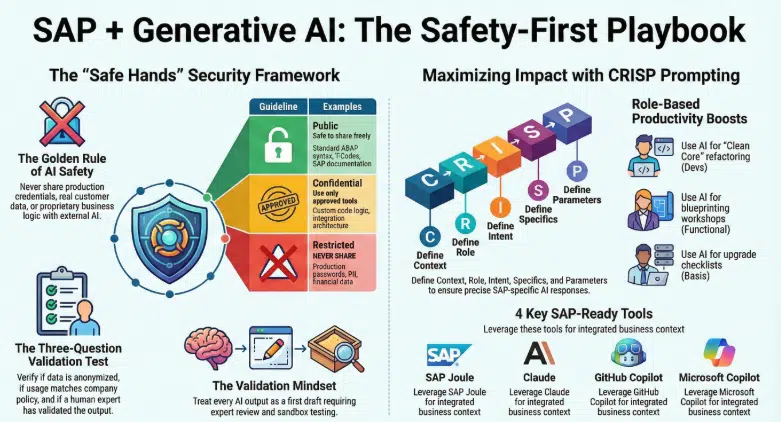
- SAP Joule: SAP’s very own embedded AI copilot, which is context-aware and deeply integrated across S/4HANA, BTP, SuccessFactors, and Ariba.
- Claude (Anthropic): Known for advanced reasoning, this AI is exceptional for code generation, debugging, technical documentation, and complex problem-solving.
- ChatGPT (OpenAI): A highly versatile, general-purpose AI perfect for drafting, brainstorming, and exploring problems conversationally.
- GitHub Copilot: An AI pair programmer integrated into IDEs, highly useful for ABAP development in ADT and BTP development in VS Code.
- Microsoft Copilot: Great for data analysis and presentation creation in Excel and PowerPoint, complementing SAP analytics.
The Golden Rule: Keeping Your SAP Landscape Safe
Before you type a single prompt into an AI tool, you must adopt the Golden Rule of AI: Never share production credentials, real customer data, proprietary configurations, or sensitive business logic with any external AI tool. You must treat every single AI interaction as if it were visible to the general public.
Before using any AI tool, apply this simple three-question test:
- Is the data anonymized or synthetic? If it contains personally identifiable information (PII), financial figures, or real customer names, do not share it.
- Does my organization’s policy permit this? Always consult your IT security team or data protection officer.
- Could this output be used without verification? A qualified human must always validate AI outputs; never deploy AI-generated code or advice directly into production without a thorough review.
The Validation Mindset
Generative AI is a powerful assistant, but it is not infallible. Every output requires strict human validation, which is especially critical in SAP environments where incorrect code can lead to data corruption, financial misstatements, or costly system downtime. Always treat AI outputs as a “first draft” that requires your expert review and testing.
How Different SAP Roles Can Leverage AI
Generative AI offers tailored benefits depending on your specific focus area within the SAP landscape.
1. SAP Technical Developers (ABAP / BTP / Fiori)
Technical developers stand to gain some of the most immediate productivity improvements. AI acts as an always-available pair programmer that understands SAP-specific patterns.
- Code Generation: AI can rapidly generate ABAP code, CDS views, RAP business objects, Fiori elements annotations, and BTP CAP models based on natural language descriptions.
- Legacy Modernization: You can paste legacy classic ABAP code into an AI tool and ask it to refactor the code for S/4HANA Clean Core using new syntax.
- Unit Testing and Debugging: AI excels at generating ABAP Unit test classes covering boundary conditions, and diagnosing errors when provided with an error message and code context.
2. SAP Functional Consultants
Functional consultants bridge the gap between business requirements and SAP configuration. AI empowers consultants across the entire project lifecycle.
- Requirements and Gap-Fit Analysis: AI can map business requirements against standard SAP functionality, quickly identifying areas requiring custom development.
- Documentation: Generating configuration documents, functional specifications, and test scripts is traditionally time-consuming. AI can generate robust first drafts based on business scenarios, allowing you to refine them with your domain expertise.
- Project Delivery: AI can pre-generate discovery questionnaires for blueprint workshops, generate cutover checklists, and even draft end-user training guides with placeholders for screenshots.
3. SAP Basis and Infrastructure Teams
Basis teams manage the critical foundation of the SAP application. AI can assist with system monitoring, upgrade planning (like generating pre-upgrade checklists for S/4HANA), performance tuning, and security hardening.
Crucial Warning: Basis teams handle the most sensitive credentials in the landscape. Never share ABAP client passwords, HANA SYSTEM user credentials, SSL certificates, or system connection parameters with any AI tool. Always anonymize hostnames and system IDs.
4. Project Stakeholders and Decision Makers
Project managers, CIOs, and business process owners can use AI to bridge technical complexity and strategic clarity. AI can help create RFP scoring matrices for vendor evaluations, transform raw sprint data into executive-ready status reports, and identify potential risks for S/4HANA greenfield implementations.
Master the Art of Prompting with the CRISP Framework
The quality of the output you get from AI is directly proportional to the quality of your input. In SAP, precision is everything. To get the best results, use the CRISP framework:
- C – Context: Specify the SAP module, version (e.g., ECC vs. S/4HANA), and technical environment.
- R – Role: Tell the AI who to act as (e.g., senior ABAP developer, SD functional consultant).
- I – Intent: Clearly state what you need (e.g., code, troubleshooting steps, documentation).
- S – Specifics: Include exact transaction codes, table names, version numbers, or error messages.
- P – Parameters: Define the output format, length, level of detail, and assumptions to avoid.
Example of a Weak Prompt: “How do I create an ALV report?” Example of a CRISP Prompt: “Context: S/4HANA 2023 FPS01, ABAP for Cloud. Role: Act as a senior ABAP developer. Intent: Create a reusable ALV report class. Specifics: Display purchase orders from EKKO/EKPO with dynamic column selection. Include sort, filter, and export functionality. Parameters: Use CL_SALV_TABLE, include error handling, add comments explaining each section. Output production-ready code.”
Navigating the AI Adoption Maturity Model
AI adoption is a journey. Professionals should aim to progress safely through these levels:
- Beginner: Using AI to explain SAP concepts, understand error messages, and learn transaction codes (focusing on understanding, not copy-pasting).
- Intermediate: Generating first drafts of code, configuration documents, and test scripts while practicing prompt engineering.
- Advanced: Integrating AI into daily workflows for code reviews, architectural design, and complex debugging, always validating in a sandbox system first.
- Pro / Expert: Designing AI-augmented processes, creating reusable prompt libraries, and establishing AI governance policies for the broader team.
Best Practices for Enterprise AI Governance
For consulting firms and enterprises, AI usage without guardrails introduces security risks and compliance violations. Organizations must implement strong governance pillars. This includes maintaining a curated list of approved AI tools, classifying data sensitivity, and establishing mandatory peer review protocols before any AI-generated code or configuration enters the transport chain. Furthermore, teams should document an audit trail of when and how AI was used, and invest in regular AI literacy training.
Conclusion: The Road Ahead
The integration of AI into the SAP ecosystem is only going to deepen. With SAP’s strategic investments in Joule, Business AI, and the AI Foundation on BTP, AI will soon be embedded into every transaction and analytics dashboard.
Generative AI is transforming the SAP profession at every single level, allowing technical developers to ship better code, functional consultants to deliver more thorough blueprints, and Basis teams to resolve issues faster. However, the technology is only as valuable as the professional wielding it.
The future of SAP belongs to professionals who embrace AI thoughtfully. Start where you are, learn one prompt at a time, respect data sensitivity, and above all—always, always verify before you deploy.
FAQs: Generative AI for SAP Consultants
Is Generative AI safe for SAP production environments?
Only when properly governed and validated. Never deploy AI-generated code without expert review.
Can AI replace SAP consultants?
No. It amplifies productivity but cannot replace domain expertise.
What is the safest AI tool for SAP?
SAP Joule is safest for enterprise use because it’s embedded and context-aware within SAP landscapes.
How do I start using AI as an SAP consultant?
Start by using AI to explain concepts and generate documentation drafts. Progress gradually.
What’s the biggest risk of AI in SAP?
Unvalidated outputs causing system errors or compliance violations.
You might also find the following articles interesting.
- mastering sap mrp practical guide optimize supply chain planning
- enterprise with sap business ai
- sap s4hana transition guide to data migration
- sap clean core
- SAP S/4HANA private cloud 2025
- introduction sap btp for consultants
- sap consultants productivity with joule
- Migration guide to SAP data migration
- SAP btp guide to app development
- Transformation journey 4hana implementation
- Empowering enterprises with SAP solutions
- blackline tool vs traditional process
- Sap cutover plan a comprehensive guide
- Fiori Configuration Guide
- SAP ECC to S4HANA data migration
- earn sap btp
- Retail insights with sap car
- leanix an introductory guide
- building side-by-side extensions on SAP BTP
- sap ecc vs s4 hana key changes and benefits
- sap ides
- Understanding RFNO in SAP s4hana
- SAP Clean Core
- SAP ABAP beginner’s journey
- Grow with sap vs rise with sap comparison
- Rise with sap
- Year-end activities in sap
- SAP TM Transaction codes
- ethical ai development
- sap migration data configuration tools
- Simplifying SAP s4hana custom code migration
- SAP EWM integration
- sap project intelligence network
- advanced production integration with SAP EWM
- Credit management comparison of sap fscm
- SAP EWM


