The transition from traditional SAP ERP (ECC) to SAP S/4HANA is not merely a database upgrade; it represents a fundamental shift in how organisations manage their most critical asset: Master Data. For years, SAP users relied on separate modules for customers and vendors, but the modern business landscape demands more flexibility. This shift is embodied in the Business Partner (BP) concept, which is now the mandatory way to manage external entities in S/4HANA.
Whether you are a functional consultant implementing a new system or an end-user navigating the new interface, understanding the Business Partner model is essential. This blog post dives deep into why this change happened, how to execute the new workflows, and what happens behind the scenes in the database.
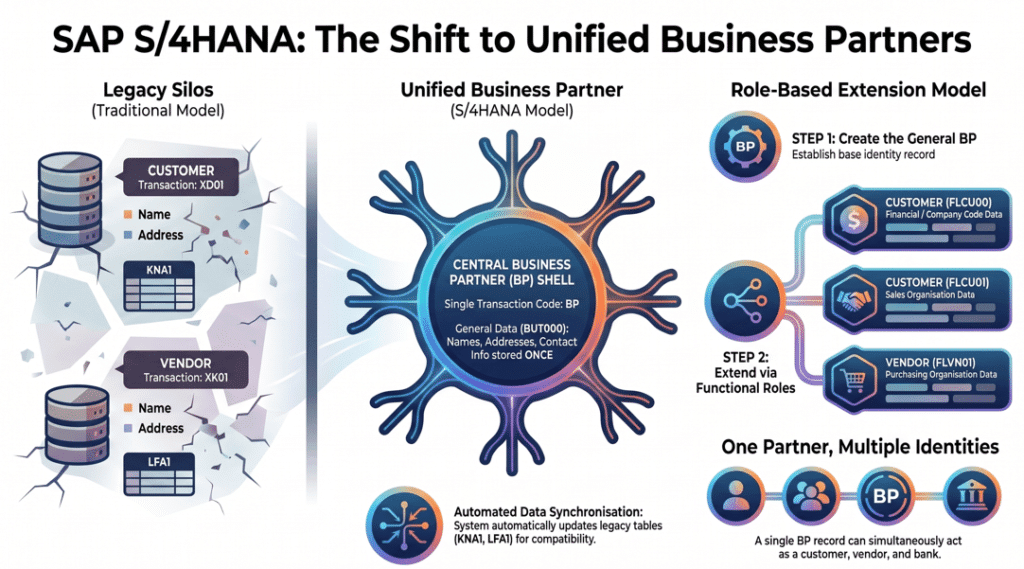
Table of Contents
1. The Legacy Challenge: Why Leave XD01 and XK01 Behind?
In traditional SAP ERP systems, managing external business entities was handled through two separate master data categories: customers and vendors. Each had its own dedicated data model, unique transaction codes, and separate master records.
For example, if you did business with Walmart, they might exist as a vendor (number 4100) for accounts payable and as a customer (number 80101) for accounts receivable. Even though Walmart is a single real-world entity, the system saw two distinct records with no automatic link between them.
Limitations of the Old Model:
- Data Duplication: Maintaining the same address and contact info in two places increased redundancy and maintenance efforts.
- Rigidity: The old model struggled with complex roles. A bank, for instance, isn’t just a customer or a vendor; it acts as a partner in multiple financial transactions.
- Siloed Views: There was no built-in way to view all roles of a business entity holistically across sales, purchasing, and finance.
To solve these issues, SAP introduced the Business Partner model as a centralized “shell” that can hold all roles an entity might play.
2. What Exactly is a Business Partner?
In SAP S/4HANA, a Business Partner is a centralized master record representing any party with which your company conducts business. This could be a customer, vendor, bank, broker, tenant, or even an internal employee.
Think of the Business Partner as a container. The “shell” of this container holds General Data—information that stays the same regardless of whether you are buying from them or selling to them. This includes:
- Name and Address
- Communication details (phone, email, language)
- Identification numbers and tax categories
Once this “shell” is created, you extend it by assigning specific roles. One BP record can have a customer role for sales, a vendor role for procurement, and a bank role for treasury all at once.
3. The Mandatory Mandate: New Transactions
With the launch of S/4HANA, the Business Partner model became mandatory. This means legacy transaction codes like XD01 (Create Customer) or XK01 (Create Vendor) are now deprecated.
If an end-user attempts to use an old transaction like VD01, S/4HANA will automatically redirect them to the BP transaction. The transaction code BP is now the unified, single point of entry for creating, changing, and displaying all master data. This unification simplifies training and improves data consistency across the enterprise.
4. Step-by-Step: Creating and Extending a Business Partner
For end-users, the process of setting up a new partner now follows a logical, two-step flow.
Step 1: Create the General Business Partner
First, you create the “shell” using transaction BP.
- Select the BP Category: Person, Organization, or Group.
- Enter General Data: Name (e.g., “G Aerospace”), search terms, and full address.
- Save: The system assigns a unique Business Partner number (e.g., BP 61). At this point, the entity exists in the system but cannot yet be used for sales or purchase orders.
Step 2: Assign Roles to Extend Functionality
To make BP 61 functional, you must assign specific roles.
- For Customers: Assign role FLCU00 for financial data (Company Code) and FLCU01 for sales data (Sales Organization).
- For Vendors: Assign role FLVN00 for finance data and FLVN01 for purchasing data.
As you assign these roles, new tabs appear in the interface (like “Company Code” or “Purchasing”), allowing you to enter reconciliation accounts, payment terms, and delivery conditions.
5. Technical Insight: What’s Happening in the Tables?
For SAP Consultants, understanding the data storage layer is critical for troubleshooting and reporting. S/4HANA uses a “hybrid” approach to ensure backward compatibility.
- The Heart – BUT000: This new table stores the general Business Partner information (Name, Address, BP Number).
- The Legacy Layers: When you assign a customer or vendor role, the system automatically synchronizes data into the old legacy tables:
- Customers: KNA1 (General), KNVV (Sales), and KNB1 (Finance).
- Vendors: LFA1 (General), LFM1 (Purchasing), and LFB1 (Finance).
This synchronization ensures that your existing custom reports and interfaces that read from KNA1 or LFA1 continue to work without a complete rewrite.
Note for Consultants: The BP number and the customer/vendor number can be different, though they are linked internally. For instance, Bank of America might have BP number 63 but be assigned vendor number 100013.
6. Key Benefits of the Unified Model
The shift to Business Partners offers several strategic advantages:
- 360-Degree View: You can see every relationship your company has with an entity in one place.
- Flexible Roles: It supports modern business models, such as real estate (where one person might be a tenant and a landlord) or treasury management.
- Improved Accuracy: Changes made to a partner’s address in the general view automatically update across all customer and vendor roles.
- Integration-Ready: The BP model is the foundation for advanced modules like CRM, SRM, and Financial Supply Chain Management.
7. Pro-Tips for Success
To master the BP transaction, keep these user-friendly features in mind:
- Visual Indicators: The BP interface uses red dots on tabs to highlight missing mandatory data, helping you identify errors quickly.
- Non-Sequential Entry: Unlike legacy transactions, you can move freely between tabs in any order before saving.
- Search First: Always search for a partner by name or address before creating a new one to prevent data duplication.
Conclusion
The Business Partner mandate in SAP S/4HANA is a significant evolution that addresses the limitations of the old, rigid master data structures. By separating general identity from business roles, SAP provides a future-ready architecture that is both scalable and intuitive.
For consultants and users alike, mastering the BP transaction is the first step toward efficient enterprise management in the S/4HANA era.
Are you preparing for a migration to S/4HANA? Start by exploring the underlying tables like BUT000 and practicing role extensions in a sandbox environment to get a feel for this powerful new framework.
Would you like me to create a set of flashcards to help you or your team memorize the key Business Partner roles and table names mentioned in this guide?
FAQs on SAP Business Partner in S/4HANA
What is SAP Business Partner in S/4HANA?
It is a unified master data model that replaces separate customer and vendor records.
Why is BP mandatory in S/4HANA?
It ensures consistency, flexibility, and integration across modules.
Can one BP have multiple roles?
Yes, a single BP can act as customer, vendor, and more.
What table stores BP data?
The primary table is BUT000.
Are old transactions still usable?
No, they are deprecated and redirected to BP.
How does BP improve reporting?
It provides a unified view of all business relationships.
You might also find the following articles interesting
- blueprint for sap business data cloud
- sap joule sales distribution transformation
- SAP hana custom code migration
- SAP GTS E4H Migration
- Generative ai for sap consultants
- mastering sap mrp practical guide optimize supply chain planning
- enterprise with sap business ai
- sap s4hana transition guide to data migration
- sap clean core
- SAP S/4HANA private cloud 2025
- introduction sap btp for consultants
- sap consultants productivity with joule
- Migration guide to SAP data migration
- SAP btp guide to app development
- Transformation journey 4hana implementation
- Empowering enterprises with SAP solutions
- blackline tool vs traditional process
- Sap cutover plan a comprehensive guide
- Fiori Configuration Guide
- SAP ECC to S4HANA data migration
- earn sap btp
- Retail insights with sap car
- leanix an introductory guide
- building side-by-side extensions on SAP BTP
- sap ecc vs s4 hana key changes and benefits
- sap ides
- Understanding RFNO in SAP s4hana
- SAP Clean Core
- SAP ABAP beginner’s journey
- Grow with sap vs rise with sap comparison
- Rise with sap
- Year-end activities in sap
- SAP TM Transaction codes
- ethical ai development
- sap migration data configuration tools
- s4hana custom code migration
- SAP EWM integration
- sap project intelligence network
- advanced production integration with SAP EWM
- Credit management comparison of sap fscm
- SAP EWM


2 thoughts on “Mastering SAP S/4HANA Business Partner (BP): The Ultimate Guide for Consultants and End-Users”