In the era of Cloud ERP, the way we implement and configure systems has undergone a radical shift. For SAP consultants working with SAP S/4HANA Cloud Public Edition, the traditional Implementation Guide (IMG) is no longer the primary driver. Instead, we have SAP Central Business Configuration (CBC)—a powerful, process-centric tool designed to streamline the “Intelligent Enterprise”.
This blog post explores how CBC transforms the implementation experience and why it is an essential skill for the modern SAP consultant.
Table of Contents
What is SAP Central Business Configuration?
SAP Central Business Configuration (CBC) is a central tool used to configure business processes across various SAP Cloud solutions. While it currently focuses on SAP S/4HANA Cloud Public Edition, the long-term vision is to support the entire SAP cloud portfolio, including SAP SuccessFactors and SAP Ariba.
Unlike the transaction-heavy on-premise configurations of the past, CBC is business-process centric. It allows consultants to manage configurations and ongoing operations centrally through a guided UI known as Project Experience.

The Core Phases of the CBC Workflow
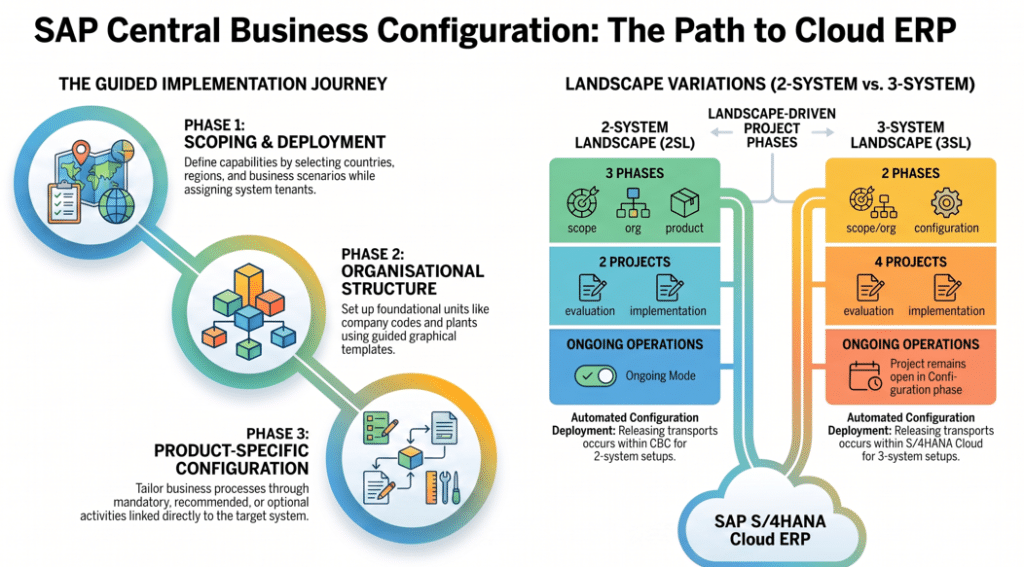
Navigating a project in CBC involves a structured, guided workflow. As a consultant, you will lead your clients through these primary stages:
1. Scoping and Deployment Targets
The journey begins by defining what the solution will do. You select the countries/regions and the specific business scenarios (scope items) via the Business Adaptation Catalog (BAC).
- Key Feature: Built-in rules ensure your selections are logical and consistent from both a technical and business perspective.
- Deployment: You must assign a “Deployment Target”—a dedicated system tenant—to your project during this phase to exchange data with the S/4HANA Cloud system.
2. Organisational Structure Management
Once the scope is set, you define the foundational elements of the business. The Set Up Organizational Structure app provides both graphical and table views to create units like Company Codes, Plants, and Sales Organizations.
- Constraint: At least one company code must be defined for every country selected during scoping.
- Automation: Once confirmed, the system automatically instantiates organizational structure templates and identifies dependent configuration activities.
3. Product-Specific Configuration
This is where the fine-tuning happens. CBC identifies the necessary configuration activities based on your active scope.
- Activities are categorized as Mandatory (must complete to go live), Recommended, or Optional.
- Tip: Launching an activity in CBC often opens the target SAP S/4HANA Cloud system directly where the actual processing occurs.
2-System vs. 3-System Landscapes: What Consultants Need to Know
A critical part of your role is understanding the landscape architecture. CBC behaves differently depending on the environment:
| Feature | 2-System Landscape (2SL) | 3-System Landscape (3SL) |
| Phases | 3 Phases (Scope/Org, Product-Config, Production Settings) | 2 Phases (Scope/Org, Product-Config) |
| Transports | Released within CBC | Released within SAP S/4HANA Cloud |
| Production Settings | Managed in CBC | Managed via dedicated apps in S/4HANA Cloud |
| Ongoing Operations | Project switches to “Operations Mode” after go-live | Project remains in “Product-Specific Config” phase |
Why CBC is a Game Changer for Consultants
- Accelerated Deployment: With preconfigured, ready-to-run content and industry best practices, the time-to-value for customers is significantly reduced.
- Scalability: The “Initiate Change” feature allows you to add new countries or business scenarios post-go-live without starting from scratch.
- Standardized Methodology: CBC is perfectly aligned with the SAP Activate Methodology, supporting the Explore, Realize, and Deploy phases.
- Integrated Testing and Migration: It works in tandem with tools like the SAP Migration Cockpit and supports Fit-to-Standard workshops to ensure the system meets business needs without heavy customisation.
Expert Pro-Tip: Roles and Authorizations
To successfully manage a CBC project, ensure your team has the correct roles. For instance, a Program Manager (SAP_CBC_CONSUMPTION_PROGRAM_LEAD) has access across all projects, while a Key User can perform most tasks except for critical actions like creating a project or initiating a change.
Conclusion
SAP Central Business Configuration is more than just a setup tool; it is the backbone of SAP’s cloud-first strategy. For consultants, mastering CBC means moving away from manual transactions and toward becoming a strategic partner in digital transformation.
Ready to dive deeper? Check out the SAP Help Portal or the SAP Central Business Configuration Learning Journey to stay ahead of the curve.
You might also find the following articles interesting
- sap extensibility guide
- sap brim comprehensive guide
- sap business partner in s4hana guide
- blueprint for sap business data cloud
- sap joule sales distribution transformation
- SAP hana custom code migration
- SAP GTS E4H Migration
- Generative ai for sap consultants
- mastering sap mrp practical guide optimize supply chain planning
- enterprise with sap business ai
- sap s4hana transition guide to data migration
- sap clean core
- SAP S/4HANA private cloud 2025
- introduction sap btp for consultants
- sap consultants productivity with joule
- Migration guide to SAP data migration
- SAP btp guide to app development
- Transformation journey 4hana implementation
- Empowering enterprises with SAP solutions
- blackline tool vs traditional process
- Sap cutover plan a comprehensive guide
- Fiori Configuration Guide
- SAP ECC to S4HANA data migration
- earn sap btp
- Retail insights with sap car
- leanix an introductory guide
- building side-by-side extensions on SAP BTP
- sap ecc vs s4 hana key changes and benefits
- sap ides
- Understanding RFNO in SAP s4hana
- SAP Clean Core
- SAP ABAP beginner’s journey
- Grow with sap vs rise with sap comparison
- Rise with sap
- Year-end activities in sap
- SAP TM Transaction codes
- ethical ai development
- sap migration data configuration tools
- s4hana custom code migration
- SAP EWM integration
- sap project intelligence network
- advanced production integration with SAP EWM
- Credit management comparison of sap fscm
- SAP EWM


