Table of Contents
Introduction of SAP S/4HANA Custom Code Migration
Transitioning from the classic SAP Business Suite to SAP S/4HANA is a massive milestone for any enterprise. However, this system conversion introduces a significant technical challenge: adapting your existing custom ABAP source code. Because SAP has simplified, optimized, and occasionally altered its core code in non-compatible ways, some of your legacy custom code will no longer function as expected, potentially causing syntax errors or system dumps.
To ensure a seamless transition to SAP S/4HANA 2025, you need a robust, structured approach to SAP S/4HANA Custom Code Migration. This comprehensive guide explores the E-A-T (Expertise, Authoritativeness, Trustworthiness) backed best practices, tools, and methodologies required to analyze, scope, and adapt your custom code for the future.
Understanding the Migration Framework
The custom code migration process is broadly divided into two main phases: the Preparation Phase (before the system conversion) and the Realization Phase (after the technical conversion).
At the heart of this process lies the Simplification Database, a dedicated database table within the SAP S/4HANA system. It contains a comprehensive list of all simplification items—changed or removed SAP objects—along with references to dedicated SAP Notes that explain the impact of these changes and provide instructions on how to adapt your code.
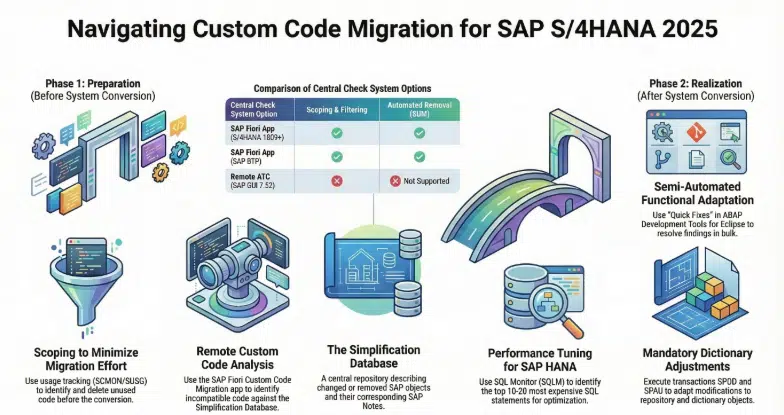
Phase 1: Preparation (Scoping and Analysis)
Before you migrate, you must identify exactly what code needs to move and what needs to be adapted. This prevents you from wasting time modernizing obsolete code.
1. Custom Code Scoping: Clean House Before You Move
One of the most critical steps in the preparation phase is “scoping”. Custom code scoping empowers you to determine which ABAP custom code is actively used in your production environment and needs to be migrated to SAP S/4HANA.
SAP highly recommends scoping your custom code to eliminate unused programs, thereby minimizing adaptation efforts and reducing system complexity. To do this effectively:
- You must monitor your productive system landscape well in advance of your migration.
- Use the ABAP Call Monitor (transaction SCMON) and transaction SUSG to collect and aggregate usage data in your production system.
- Ideally, you should collect this usage data for at least one full year to ensure that quarter-end and year-end functionalities are accurately captured.
- Any unused custom code identified during this scoping process can be packaged into deletion transport requests and permanently removed during the Software Update Manager (SUM) system conversion.
2. Custom Code Analysis: Finding the Incompatibilities
Once you have scoped your active code, the next step is custom code analysis. This process identifies the specific lines of code that must be adapted to align with SAP S/4HANA simplifications.
To run this analysis, you must set up a Central Check System that remotely executes checks on your ABAP back-end systems (SAP_BASIS 7.00 or higher) using Remote Function Calls (RFC). You have three architectural options for your Central Check System:
- Option 1: SAP S/4HANA (Release 1809 or higher) – Recommended: Using an SAP S/4HANA system as your central checker allows you to leverage the SAP Fiori Custom Code Migration app. This powerful app lets you define your migration scope based on usage data, run the latest SAP S/4HANA custom code checks, and easily filter analysis results by scope and “Quick Fix” availability.
- Option 2: SAP BTP ABAP Environment: If you prefer a cloud-based approach, you can use the SAP Business Technology Platform (BTP) ABAP environment as your Central Check System. It connects to your on-premise system securely via the SAP Cloud Connector and offers the same advanced SAP Fiori Custom Code Migration app capabilities. Because it is updated four times a year, it always features the latest check functionalities.
- Option 3: SAP NetWeaver AS ABAP 7.52: You can use an older NetWeaver 7.52 system as an ABAP Test Cockpit (ATC) central check system. However, this option relies on the classic SAP GUI and does not support usage-based scoping or filtering by scope and Quick Fix availability.
Phase 2: Realization (Custom Code Adaptation)
After the Software Update Manager (SUM) completes the technical conversion of your system, it is time for the functional adaptation of your code.
Handling Dictionary and Repository Modifications
First, you must address any standard SAP modifications. During the system conversion itself, you will use transaction SPDD to adapt modifications related to ABAP Dictionary objects. Following the SUM conversion, you will utilize transactions SPAU and SPAU_ENH to reimplement modifications related to repository objects, such as function modules, screens, programs, and interfaces.
Resolving ATC Findings with Eclipse ADT
For your actual custom ABAP code, SAP strongly recommends running the ABAP Test Cockpit (ATC) with SAP S/4HANA checks within the ABAP Development Tools (ADT) for Eclipse.
When you run these checks locally in your newly converted system, ADT generates a list of “ATC findings”. These findings directly map to SAP S/4HANA simplifications and reference the specific SAP Notes needed to resolve them. ADT offers several powerful tools to resolve these issues:
- Quick Fixes: ADT provides a semi-automated way to adapt your code through Quick Fixes. By selecting an ATC finding marked with a lightbulb icon, you can apply an automated code correction (e.g., automatically replacing obsolete database operations or adjusting code for the new MATNR material number field length extension). You can even use the “Recommended Quick Fixes” wizard to resolve multiple ATC findings simultaneously across different objects.
- Pseudo Comments: Sometimes the ATC will flag a piece of code that does not actually need to be changed—a “false positive”. In these cases, you can apply a Quick Fix that automatically appends a pseudo comment (e.g., “#EC CI_USAGE_OK) to the end of the code line. This pseudo comment does not change the code; it simply suppresses the warning so it no longer appears in future ATC check results.
- Exemptions: If a finding cannot be resolved by correcting the code or using a pseudo comment, developers can request an official exemption. Once reviewed and approved by an administrator, the exemption masks the error or warning message, clearing it from the open issues list.
Phase 3: Post-Migration (What’s Next?)
Once your code is syntax-error-free and functionally adapted to SAP S/4HANA 2025, the migration is technically complete—but your work isn’t quite finished.
1. Runtime Checks and Testing
Static code checks (like those performed by the ATC) cannot catch every potential issue, particularly when it comes to dynamic coding. You must rigorously test your applications to ensure they run correctly on SAP S/4HANA. Furthermore, you should activate the Runtime Check Monitor (transaction SRTCM) in your new productive system to catch dynamic issues, such as missing ORDER BY statements after SELECT clauses, or empty tables in FOR ALL ENTRIES clauses.
2. Performance Optimization
SAP S/4HANA runs on the lightning-fast SAP HANA in-memory database, but poorly written legacy ABAP code can still cause performance bottlenecks. To maximize your ROI, switch on the SQL Monitor (transaction SQLM) in your productive system. This tool identifies the most expensive business processes and the most frequently executed SQL statements. Sort the results by execution time and optimize the top 10 to 20 SQL statements affecting your core business processes. SAP recommends repeating this tuning cycle two to three times for optimal results.
3. Advanced Code Pushdown
Finally, once the system is stable, you can begin truly modernizing your applications. By leveraging SAP HANA’s “code pushdown” techniques—such as Core Data Services (CDS) and ABAP-Managed Database Procedures (AMDP)—you can shift data-intensive calculations directly to the database layer, drastically improving application performance and taking full advantage of the S/4HANA architecture.
Conclusion
Migrating custom code to SAP S/4HANA 2025 requires careful planning, deep technical analysis, and the right toolset. By rigorously scoping your code with the SAP Fiori Custom Code Migration app, remotely checking it against the Simplification Database, and intelligently resolving findings using Eclipse ADT Quick Fixes, you can ensure a smooth, efficient, and highly optimized transition. Remember, custom code migration is not just about making old code run on a new system—it is a prime opportunity to clean, optimize, and future-proof your digital core
Frequently Asked Questions
What is custom code migration in SAP S/4HANA?
Custom code migration involves analyzing, adapting, and optimizing existing ABAP programs so they work correctly with SAP S/4HANA’s simplified architecture.
Why is custom code incompatible with S/4HANA?
SAP redesigned many data models and removed obsolete objects, making some legacy ABAP code incompatible or inefficient.
Which tool is used to analyze custom code?
The ABAP Test Cockpit (ATC) is the primary tool used to detect S/4HANA compatibility issues.
What is the Simplification Database?
It is a repository containing all S/4HANA simplification items and documentation explaining required code changes.
What are Quick Fixes in Eclipse ADT?
Quick Fixes are automated code corrections that resolve common S/4HANA compatibility issues.
How can performance be optimized after migration?
Performance can be improved by:
Monitoring SQL statements using SQLM
Refactoring inefficient queries
Implementing CDS views and AMDP code pushdown
You might also find the following articles interesting.
- SAP GTS E4H Migration
- Generative ai for sap consultants
- mastering sap mrp practical guide optimize supply chain planning
- enterprise with sap business ai
- sap s4hana transition guide to data migration
- sap clean core
- SAP S/4HANA private cloud 2025
- introduction sap btp for consultants
- sap consultants productivity with joule
- Migration guide to SAP data migration
- SAP btp guide to app development
- Transformation journey 4hana implementation
- Empowering enterprises with SAP solutions
- blackline tool vs traditional process
- Sap cutover plan a comprehensive guide
- Fiori Configuration Guide
- SAP ECC to S4HANA data migration
- earn sap btp
- Retail insights with sap car
- leanix an introductory guide
- building side-by-side extensions on SAP BTP
- sap ecc vs s4 hana key changes and benefits
- sap ides
- Understanding RFNO in SAP s4hana
- SAP Clean Core
- SAP ABAP beginner’s journey
- Grow with sap vs rise with sap comparison
- Rise with sap
- Year-end activities in sap
- SAP TM Transaction codes
- ethical ai development
- sap migration data configuration tools
- s4hana custom code migration
- SAP EWM integration
- sap project intelligence network
- advanced production integration with SAP EWM
- Credit management comparison of sap fscm
- SAP EWM


